Dear Datagrok team,
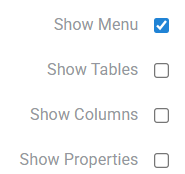
I have a question about the “Show Menu” setting under Windows preferences.
Currently, users need to manually enable Windows | Show Menu in their settings to display the analysis tabs. However, I’m wondering if there’s a way to set this option to ON by default for all users.
Background:
In our environment, we frequently work with projects that have multiple tabs. We’ve noticed that users who haven’t enabled “Show Menu” often don’t realize that additional tabs exist, which causes confusion and inefficiency.
What I’m looking for:
Ideally, I’d like to set this as a default value from the administrator side so that all users have “Show Menu” enabled by default without needing to configure it individually.
Is there a configuration file, preference setting, or administrative option that allows me to set this default for all users?
Any guidance would be greatly appreciated!
Thank you in advance.
Best,
Kosuke
1 Like
Hi Kosuke,
There are 2 ways you can do it for all users, and they are pretty much the same.
- If you have your existing package on your stand, you can write a function there that will automatically execute when the platform starts. It would look like this:
//tags: autostart
export async function autostartDSPackage(): Promise<void> {
  grok.shell.windows.simpleMode = false;
}
It says the package should autostart at platform start and set simpleMode to false, which means show tabs by default.
- If you don’t have a package, you can create a new script right in the platform and share it with all the users. It would look like this:
//name: ShowMenuAutostart
//tags: autostart
//language: javascript

grok.shell.windows.simpleMode = false;
If shared with all users, it will autostart for all of them and also do the same thing that the package function did above.
Hope this helps!
Kind regards,
Dmytro
4 Likes
Dear Dmytro,
Thank you suggesting practical solutions. Actually, we tried the second option and it worked. I really appreciate your help.
Best,
Kosuke
1 Like