Dear Datagrok team,
I would like to inquire about changes to the menu display after upgrading to DG 1.26.
Many of us prefer using the application with Settings | Windows | Show Menu enabled. I’ve noticed some significant changes in how various menus are displayed in this new version.
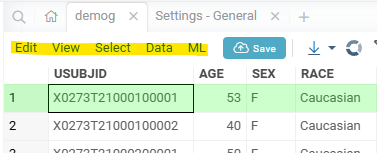
Previously, we were able to add to our custom scripts with top-menu tag, which made them accessible from the top of the screen. However, in the new version, it appears that only five fixed items are displayed there. (If I remember correctly, menu items were previously positioned at the very top of the screen.)
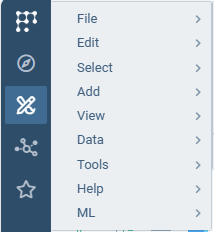
While these items can still be accessed through the Menu button in the top-left corner in DG 1.26, they no longer appear in the center-top area of the screen as fixed items. The screenshot below shows the Menu button display, but our custom code items are not included there.
I would like to know:
-
Is it possible to modify the display so that top menu items appear in the center-top area as they did in version 1.25 and earlier?
-
Or is this a permanent change, and should we get accustomed to accessing these items through the top-left Menu button going forward?
Thank you for your assistance in clarifying this matter.
Best regards,
Kosuke
Hi,
Sorry for loosing your functionality! We will try to get it back as soon as possible.
Could you please clarify two thign for me to better understand:
- What menu paths do you use, It’s first level items, or somewhere inside?
- What functions? Are they table-related, or general?
I’m asking because we split functionality to tableview-related actions and global.
Also, I will highly appreciate if you could gibe me your // top-menu: lines.
Hi Alex,
-
It’s a top-level menu item.
-
For example, I use “//top-menu: MyCompany | Chem | MyFragmentation” to execute our company’s original compound structure analysis code. Since it uses table data as input, I believe it is tableview-related functionality.
-
In this case, a menu called “MyCompany” should be displayed, but it is not showing in version 1.26.
If you have any questions, please let me know.
Best,
Kosuke
Ok, I understand it now, thank you for clarification!
As a temporary workaround until we fix it, I recommend to change it to Chem | MyCompany | …
Chem section is still showing.
We fix root level menus shortly, sorry for your inconcenience.
1 Like
Dear Kosuke,
Thank you for bringing this to our attention.
We’ve created a ticket to track this issue — you can follow it here: #3439.
We’ll keep you posted once it’s resolved or included in a release.
Best,
Olesia
1 Like
Dear Alex and Olesia,
Thank you for dealing with my issues and showing workaround to temporarily fix it at this moment.
I will share it with colleagues and am looking forward to being fixed near future. I always appreciate your prompt response.
Best regards,
Kosuke
1 Like
I’ve added functions that accept DataFrame as a parameter to TableMenu.
You can check it on our bleeding-edge docker container or on dev.datagrok.ai.
We will make a patch soon.
3 Likes
Dear Kosuke,
We’ve included the fix for the top menu custom item display issue in patch 1.26.3.
Could you please confirm whether this problem has been resolved on your side, if it’s still relevant for you?
Best regards,
Olena
1 Like
Dear Olena,
I forgot letting you know about it. Actually the issue was solved by that patch. I appreciate your dealing with it.
Best, Kosuke
3 Likes